|
|
|
 |
iSkysoft Video Converter for Mac |
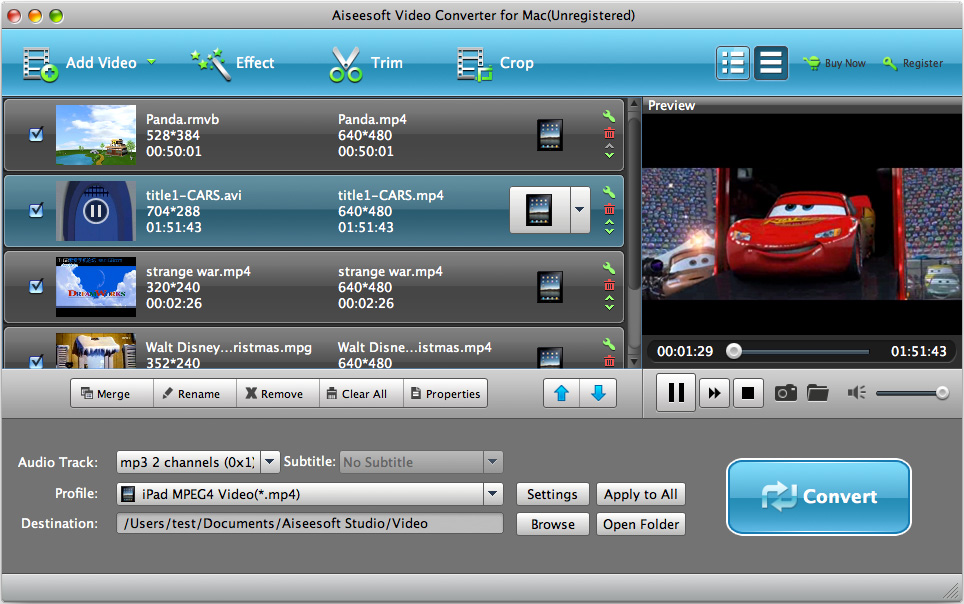
iSkysoft Video Converter for Mac is a best video converter for Mac which can convert video files from one format to another format and convert video to audio for Mac OS X users. It supports all video popular formats indcluding flv, MPEG1, MPEG2, MP4, 3GP, 3G2, MOV, AVI, Mpeg TS/TP (for HD Video), etc. iSkysoft Video Converter for Mac can also convert video to audio formats including WAV, OGG, 3GP, Mp3 and M4A.
iSkysoft Video Converter for Mac works perfectly for almost all popular video players like iPod touch, iPod classic, iPod nano, iPhone, Apple TV, PSP, PS3, Youtube (web), Creative Zen, iRiver PMP, Archos, various video mobile phones and many other digital video and audio players.
This Mac video converter software lets you set video brightness, contrast, saturation, crop video, trim video/audio and even merge multiple files into one file. Batch conversion is also supported by this powerful Mac video converter. Convert videos on Mac OS X with iSkysoft Video Converter for Mac and enjoy your colorful digital life! |
 |
 |
|
| |
$35.00 |
|
|
|
 |
|
|
 |
| |
| key Features |
|
• Convert video for most portable players
This Mac video converter provides several optimized settings for iPod, iPhone, Apple TV, PSP, PS3, Creative Zen, iRiver PMP, Archos, etc. to output specified video files which can be played directly without further settings. for example, If you want iPod 320*240 files in normal quality, what you need to do is choosing "iPod (320*240) MPEG-4 Normal-.*mp4" on the output format list. Of course, you can set the advanced parameters like video size, bit rate, frame rate, etc. The new version supports new video formats: MKV, WMV, MOD, ASF, MOD.
• Extract audio from video files or convert between audio files
Convert video to audio formats including MKA, OGG, 3GP, MP3, MP2 and M4A, etc. (act as a Mac Video to Audio Converter)..
• Crop video
This Mac video converter lets remove black bars on the movie.
• Various video and audio settings
Set video output settings including resolution, frame rate, encoder, bit rate. Set audio output settings including sample rate, channel, encoder and bit rate.
• Trim video and audio files
You can trim your video or audio files and convert the segment you want with iSkysoft Video Converter for Mac.
• Capture pictures (bmp, jpg) from video
Using this video converter for Mac, you can capture images by clicking the snapshot button while previewing the movie.
• Customize video effects
Set movie video brightness, contrast, saturation, and choose to apply special video effects to your video files.
•Merge file
This Mac video converter provides you the function of merging all added files and output one file.
•Easy to use
It is the easiest Mac video converter to convert videos to all sorts of video and audio formats with only a few intuitive steps. You can preview video files before the conversion to adjust the output settings.
•Designed specifically for Mac OS X
An excellent video converter developed specifically for Mac OS (including Mac OS X, 10.5 leopard) users. |
|
| Why choose iSkysoft Video Converter for Mac |
|
• Fully functional
• Free technical support
• Free upgrades
• Five-star awards
|
| System Requirements |
|
• MAC OS X (include Mac OS X 10.5 Leopard) or above operating system.
• At least 512M physical RAM.
• 1G Hz Intel or PowerPC processor, or above.
• 1024*768 resolution display or higher.
|
|
 |
 |
 |
 |
 |
|
|